
Weighted Grade Calculator
college grade calculator with weights
Free weighted grade calculator with multiple scores per category. Find your grade or what you need on your final exam.
Weighted Grade Calculator
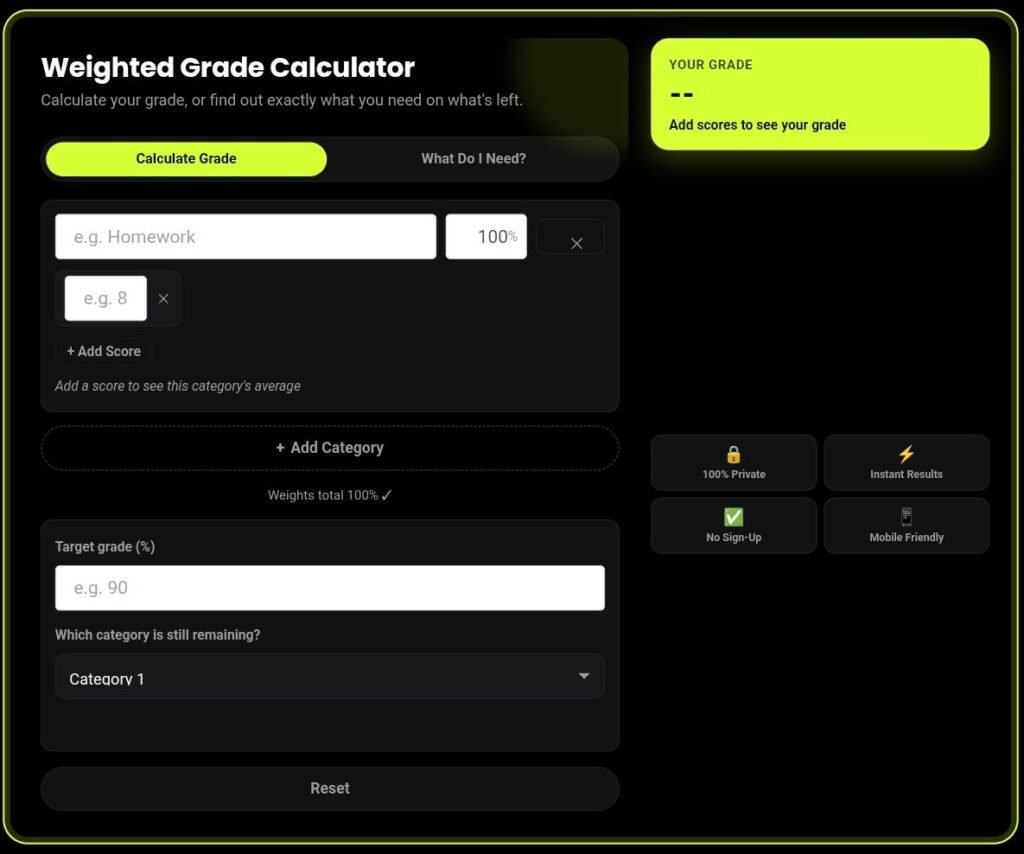
Calculate your grade, or find out exactly what you need on what's left.
What Is a Weighted Grade Calculator?
A weighted grade calculator is a tool that computes your overall course grade when different assignments count for different percentages — for example, homework worth 20%, tests worth 40%, and a final exam worth 40%. Unlike a simple average, it multiplies each category's score by its weight before combining them, which is how most college syllabi actually calculate grades.
How to Use This College Grade Calculator With Weights
Add your categories.
Type in each grading category from your syllabus (Homework, Midterm, Final Exam, etc.) and its weight as a percentage.
Enter your scores.
Add every assignment score inside a category — the calculator averages them automatically, so you don't need to do that math yourself.
Check your weights add up to 100%.
The tool flags it automatically if they don't, and still gives you an accurate "grade so far."
Read your live grade.
Your weighted percentage and letter grade update instantly as you type.
What Grade Do I Need on My Final Exam?
Switch to "What Do I Need?" mode to answer the question every student asks during finals week. Enter your target overall grade and select which category is still remaining (usually your final exam) — the calculator tells you the exact score you need on it.
If the number comes back above 100%, that target isn't mathematically reachable with a normal score, and the tool tells you so plainly instead of leaving you to guess. If it comes back at 0% or below, you've already secured that grade — good news before you've even sat the exam.
Weighted Grade Formula (With a Worked Example)
The formula behind every weighted grade calculation:
Example: Homework (20%) averaging 85%, Tests (40%) averaging 82%, Final Exam (40%) scoring 90%:
Why Use This Weighted Grade Calculator?
Get your grade faster, avoid manual calculations, and see exactly what you need to improve your final result.
Multiple scores per category
Most calculators make you average your homework scores by hand first. This one does it for you.
Reverse mode built in
Find out what you need on remaining work, not just your current grade.
100% private
Every calculation runs in your browser. Nothing is uploaded or stored.
No sign-up, no ads blocking the tool
Get instant results without creating an account or dealing with distracting ads.
Why This Tool Is Better Than Other PDF Tools
Unlike many popular PDF platforms such as iLovePDF, and Adobe Acrobat Online, this tool freeconvertzo is designed with a simpler, privacy-first experience — so you can complete your PDF task without unnecessary signup steps, complicated interfaces, or waiting for cloud processing. Instead of sending your files to a remote server, browser-based processing can keep your documents on your own device, making the workflow faster, more private, and convenient. Whether you need to add a password, edit, convert, compress, or manage a PDF, this tool focuses on free access, no-watermark output, simple controls, and instant results without making users navigate through unnecessary features or account requirements.
FAQ
Frequently Asked Questions
Is a weighted grade the same as my GPA?
No. A weighted grade is your percentage score in one course, based on category weights from that course’s syllabus. GPA is a separate calculation that converts course grades into grade points and averages them across all your courses.
What's the difference between a weighted grade and a simple average?
A simple average treats every score equally. A weighted grade multiplies each category’s average by its assigned importance (weight) before combining them — so a final exam worth 40% affects your grade far more than a quiz worth 5%, which matches how most syllabi actually calculate grades.
Can I use this for both high school and college classes?
Yes. Enter whichever categories and weights your syllabus lists — the underlying formula is identical whether it’s a high school class or a college course.
Is my grade data saved or sent anywhere?
No. Every calculation happens locally in your browser. Nothing is uploaded, stored, or sent to a server, so your grades stay completely private.
How do I find out what I need on my final exam specifically?
Switch to “What Do I Need?” mode, enter your target overall grade, and select your final exam as the remaining category. The calculator solves for the exact score needed on that one category.
Do the category weights need to add up to 100%?
No. If your weights don’t total 100%, the calculator automatically normalizes the result and still shows an accurate running grade — with a note letting you know it’s based on partial coursework.