
PDF to QR Code Generator Free Online
PDF to QR code generator free online — turn any PDF into a scannable QR code in seconds, right in your browser. No signup, nothing stored.
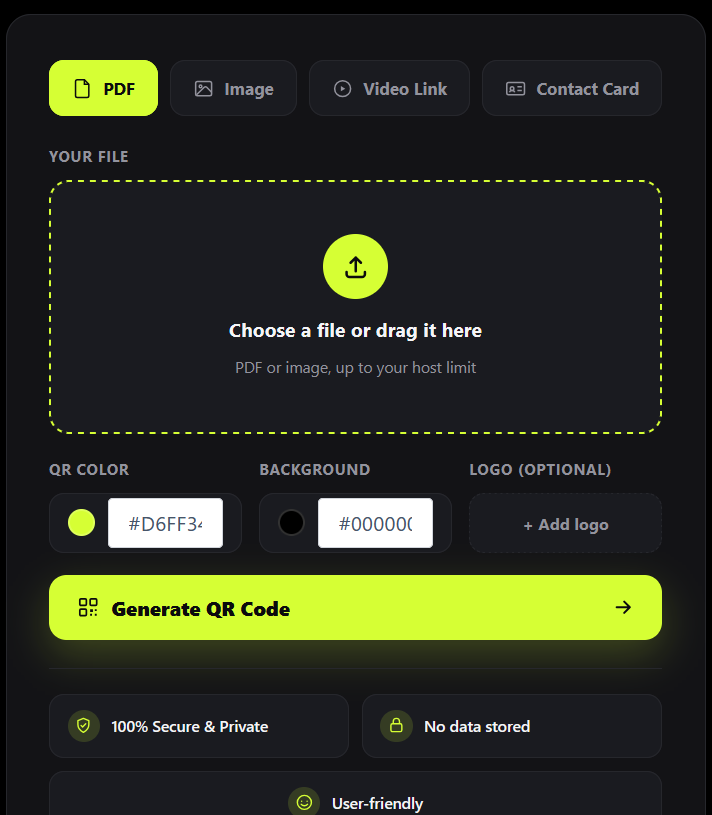
PDF to QR Code
Upload once, scan forever. Update the file anytime — the QR code never changes.
How to Use This PDF to QR Code Generator Free Online
Upload your file
Drag and drop, or click to browse.
Customize your QR code
Pick a color, background, and optional logo.
Generate QR Code
Click "Generate QR Code." Your code is ready in seconds.
Download or copy the link
Scan it, print it, or embed it anywhere.
More Than Just PDFs — One Tool, Four Formats
Image to QR Code Generator
Turn JPG, PNG, or any image into a scannable QR code for easy sharing.
Link to QR Code Converter
Paste any URL or video link and convert it into a QR code instantly.
Contact Card (vCard) QR Code
Generate a QR code that saves your contact details directly to someone's phone.
Why Choose This PDF to QR Code Generator Free Online
Easy Sharing
Share your contact details instantly with a simple scan.
Print Friendly
Print on business cards, brochures, flyers, and more.
Always Updated
Update your PDF anytime. QR code remains the same.
Professional
Looks professional and builds trust instantly.
Why This Tool Is Better Than Other PDF Tools
Unlike many popular PDF platforms such as iLovePDF, and Adobe Acrobat Online, this tool freeconvertzo is designed with a simpler, privacy-first experience — so you can complete your PDF task without unnecessary signup steps, complicated interfaces, or waiting for cloud processing. Instead of sending your files to a remote server, browser-based processing can keep your documents on your own device, making the workflow faster, more private, and convenient. Whether you need to add a password, edit, convert, compress, or manage a PDF, this tool focuses on free access, no-watermark output, simple controls, and instant results without making users navigate through unnecessary features or account requirements.
FAQ
Frequently Asked Questions
Is this PDF to QR code generator free?
Yes. SnapQR is completely free to use, with no signup, no watermark, and no limit on how many QR codes you can create.
Can I update the PDF after the QR code is already printed?
Yes — this is the main advantage of a dynamic QR code. Replace the file behind your QR code anytime from the dashboard, and every already-printed or shared QR code will automatically open the new version. You never need to reprint.
Can I track how many times my PDF QR code was scanned?
Yes — every generated QR code includes basic scan tracking in the admin dashboard.
Can I turn a website link into a QR code instead of a PDF?
Switch to the “Video Link” tab (or use the link-to-QR-code option) and paste any URL — a website, landing page, or video link — to generate a QR code for it instantly.
Can I convert an image into a QR code?
Yes. Use the “Image” tab to upload a JPG, PNG, GIF, or WEBP file, and get a QR code that opens or displays that image when scanned.
What's the difference between a static and a dynamic QR code?
A static QR code has its destination locked in permanently — if the linked file or page needs to change, you must create a whole new QR code. A dynamic QR code keeps the same code but lets you update what it points to at any time, which is why it’s the better choice for anything you plan to print or share long-term.