
PDF to Link & QR Code Generator –
No Watermark, Online Free
Turn any PDF into a clean, shareable link in seconds — with our PDF to Link & QR Code Generator – No Watermark, Free, your document stays 100% yours. No branding stamped on your files, no ugly “powered by” footer, and no random domain nobody recognizes. Just your PDF, your custom link, and a real preview card people can trust before they click.
Why a Watermark-Free PDF Link Generator Matters
Most "free" PDF-to-link tools make their money by stamping their own logo across your document or forcing a countdown page before your reader can view the file. That's fine for a quick personal share — but if you're a creator, coach, or business sending notes, invoices, catalogs, or course material, a watermark makes your content look unprofessional and, frankly, makes it look like their product, not yours.
That's exactly why we built a custom PDF to link generator without watermark: your document, your brand, your custom link — nothing added, nothing hidden.
What makes it different:
- ✓ No watermark, ever
- ✓ Custom branded link
- ✓ Real preview card
- ✓ Built-in link to QR code converter
- ✓ Image to QR code generator
- ✓ No sign-up required
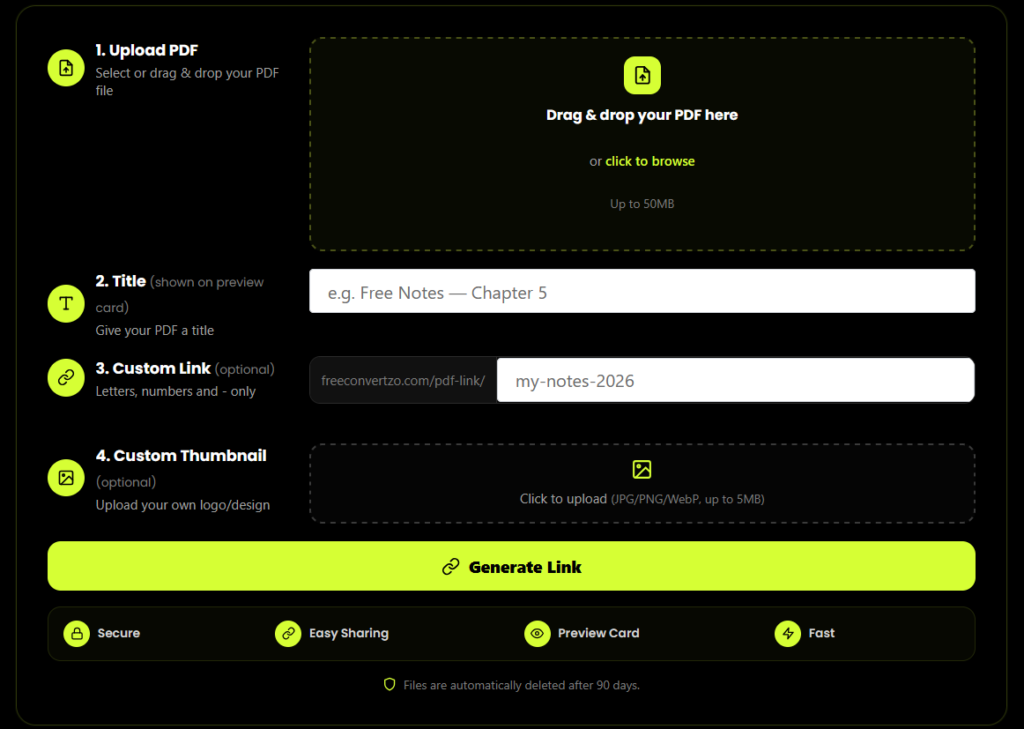
How the Custom PDF to Link Generator Works
Upload your PDF
Drag and drop your file — no account needed to get a link.
Set a custom link
Choose your own slug instead of a random one, e.g. yoursite.com/pdf-link/my-notes.
Get your link instantly
Get a clean URL in seconds — ready to paste into WhatsApp, Instagram, email, or anywhere else.
Download your QR code
Every generated link comes with a one-click QR code — perfect for posters, business cards, or Instagram Stories.
Share anywhere
Share your clean PDF link or QR code across social media, email, WhatsApp, and more.
Link to QR Code Converter
Every link you create with this tool also works as a link to QR code converter — no separate tool, no extra upload. As soon as your custom PDF link is generated, a scannable QR code is created automatically alongside it.
This is especially useful for offline-to-online sharing: print the QR code on a flyer, add it to a poster, or drop it into a presentation slide, and anyone can scan it to land directly on your PDF's preview page. Because the QR code points to your custom PDF to link generator without watermark output, the person scanning it sees your branding — not a third-party tool's.
Common uses for the link to QR code converter:
Adding a scannable link to printed course material or workbooks
Posting on Instagram Stories with the "link sticker" replaced by a scan-to-view QR
Sharing at in-person events, seminars, or workshops
Adding to business cards or product packaging
Image to QR Code Generator
Beyond PDFs, this tool also works as a standalone image to QR code generator. Upload any image — a logo, a poster design, a flyer, or a scanned document — and generate a scannable QR code that links straight to it, hosted with the same clean, watermark-free approach used for your PDFs.
This is a natural companion to the custom PDF to link generator without watermark. If your content is a single image rather than a full PDF, you don't need to convert it into a PDF first — the image to QR code generator handles it directly.
Why This Tool Is Better Than Other PDF Tools
Unlike many popular PDF platforms such as iLovePDF, and Adobe Acrobat Online, this tool freeconvertzo is designed with a simpler, privacy-first experience — so you can complete your PDF task without unnecessary signup steps, complicated interfaces, or waiting for cloud processing. Instead of sending your files to a remote server, browser-based processing can keep your documents on your own device, making the workflow faster, more private, and convenient. Whether you need to add a password, edit, convert, compress, or manage a PDF, this tool focuses on free access, no-watermark output, simple controls, and instant results without making users navigate through unnecessary features or account requirements.
FAQ
Frequently Asked Questions
How do I remove a password from a PDF?
Upload your PDF, enter the password you already have, and click “Remove Password.” The file unlocks instantly and downloads as a clean, password-free copy — no software or account needed.
Can I remove a PDF password if I don't know it or forgot it?
No. This tool only removes a password you already have — it can’t recover, guess, or bypass a forgotten password.
Is it safe to remove a PDF password using an online tool?
Yes, if the tool never uploads your file to a server. This tool processes everything locally in your browser, so your document is never transmitted or stored anywhere.
Is this pdf password remover online free tool really free?
Yes. There’s no cost, no sign-up, and no limit on how many times you can use it — every file is processed free, directly in your browser.
Is this pdf password remover online free tool really free?
Yes. There’s no cost, no sign-up, and no limit on how many times you can use it — every file is processed free, directly in your browser.
What's the difference between this and Adobe Acrobat?
Adobe Acrobat requires a paid subscription and installation. Thistool is a free, browser-based pdf password remover that needs noaccount or software.