
Merge PDF Online and Split PDF Online
Free, Instant, No Sign-Up
Need to merge PDF online and split PDF online? This free tool does both in seconds, right in your browser — no account, no software, and your files never leave your device.
How to Merge PDF Online
Upload your PDFs
Drag and drop them, or click to browse. You can add as many files as you need.
Set the order
Reorder files with the up/down arrows, or type a position number to jump a file straight to where you want it.
Click "Merge files"
Your combined PDF downloads instantly, fully assembled in the order you chose.
How to Split PDF Online
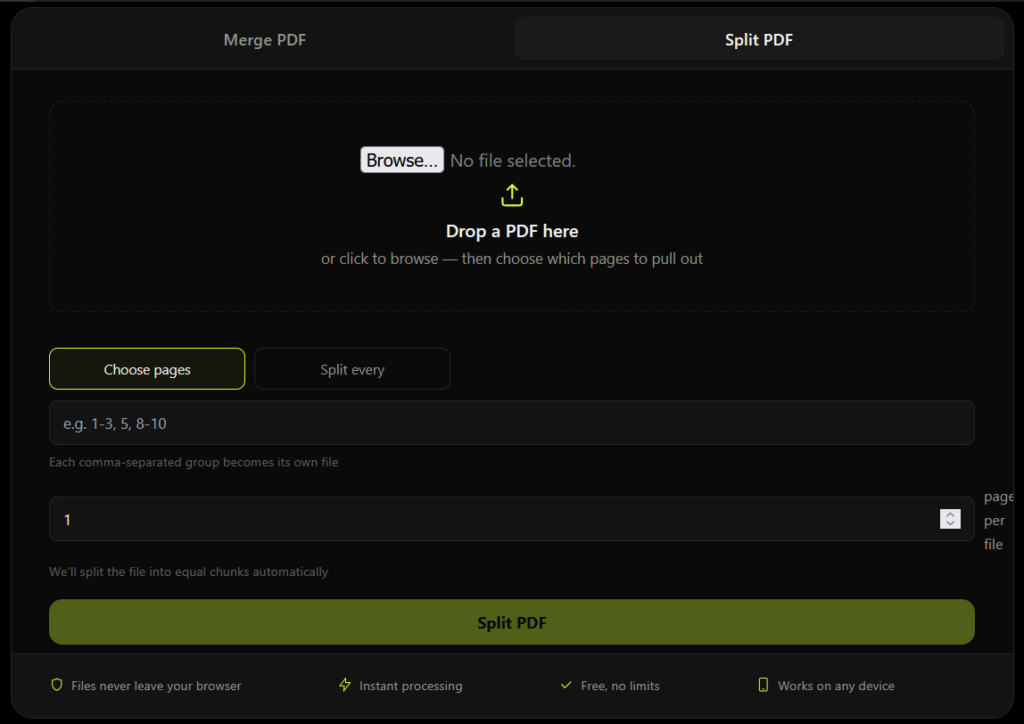
Upload one PDF file.
Choose how to split it
Either type specific page ranges (like 1-3, 5, 8-10) to pull out exact pages, or set a page count to split the file into equal chunks automatically.
Click "Split PDF"
Download a single extracted file, or a zip folder if your split produced multiple files.
Why Use This Merge PDF Online and Split PDF Online Tool
100% browser-based
Your files are processed on your own device using JavaScript, not uploaded to any server. Nothing to worry about with sensitive documents.
No sign-up required
Merge PDF online or split PDF online without creating an account or entering an email address.
No watermark, no page limit
Unlike many free tools, your output file is clean and complete.
Works on any device
Desktop, tablet, or mobile, in any modern browser.
Instant processing
Most files merge or split in under a second.
Who Uses This Tool
Students
Merging assignment pages or splitting a textbook PDF into chapters.
Job seekers
Combining a resume, cover letter, and certificates into one PDF for applications.
Professionals
Merging invoices, contracts, or reports before sending them to clients.
Teams
Extracting specific pages from long documents to share only what's relevant.
Why This Tool Is Better Than Other PDF Tools
Unlike many popular PDF platforms such as iLovePDF, and Adobe Acrobat Online, this tool freeconvertzo is designed with a simpler, privacy-first experience — so you can complete your PDF task without unnecessary signup steps, complicated interfaces, or waiting for cloud processing. Instead of sending your files to a remote server, browser-based processing can keep your documents on your own device, making the workflow faster, more private, and convenient. Whether you need to add a password, edit, convert, compress, or manage a PDF, this tool focuses on free access, no-watermark output, simple controls, and instant results without making users navigate through unnecessary features or account requirements.
FAQ
Frequently Asked Questions
Is it free to merge PDF online and split PDF online?
Yes, completely free. There’s no cost, no account required, and no limit on how many times you can use the tool.
Does merging or splitting reduce PDF quality?
No. Pages are copied exactly as they are — text, images, and formatting stay unchanged. Nothing is re-compressed or re-rendered.
How do I merge PDF files online?
Upload two or more PDFs, arrange them in the order you want using the reorder controls, then click “Merge files.” Your combined PDF downloads instantly.
How do I split a PDF into multiple files?
Upload your PDF, then either type specific page numbers or ranges (like 1-3, 5, 8-10) to extract exact pages, or set a page count to split the file into equal chunks automatically.
Can I split one PDF into more than two files at once?
Yes. Enter multiple page ranges separated by commas — each range becomes its own file, delivered together in a zip folder.
Can I extract just a few specific pages from a PDF?
Yes. Enter the page numbers you want (for example, 4, 7, 12) and only those pages are pulled into a new file.